 f382a2e3cc
For users:
-Added KA-50 III and AV8BNA Harrier to slot selection
-Changed message in mission generated success dialog
-Zone protect SAMs now part of 'Advanced Defenses' feature
-Late activated friendly/enemy CAP units are placed in mission as a template for Deployed CAP fighters (ie will not be active unless using Advanced Defenses or 'DEPLOY_FIGHTERS' name for radar ground unit)
-improve idle troop behavior at bases/FARPs

For Mission creators:
-Updated pydcs library supports new units such as technicals
-Updated pydcs library supports Falklands map
-allow troop pickup from HELO_CARRIER
-enemy units with radar can be designated to deploy intercept fighters on detection (see RotorOps.fighter options in RotorOps.lua for details) with options for min detection altitude and distance (min detection altitude allows helis to fly 'under the radar')
-Insert RotorOpsServer.lua script and trigger actions if option set in scenario config: rotorops_server: true
-scenario template triggers should now be 'untouched' after mission generation, allowing previously unsupported triggers and actions to be used, along with color coding
-block adding player helicopters if slots locked in scenario config
-Added RotorOps.draw_conflict_zones setting to give users the ability to disable or enable displaying of zones on the map.
-allow disabling spinboxes in scenario config
-mission ends 10 mins after mission success/fail
-copy helicopter start type from templates

Internal:
-github actions workflow to automatically deploy to update server
-Startup version check will ignore micro version
-bypassing triggers and merging before save (to preserve unsupported triggers in pydcs). Our goal is to leave the trigrules and trig from the source mission untouched
-if using random weather, set ice halo to auto and crystals to none
-dont put planes at airports without ILS (to avoid putting planes at helicopter airports ie. Syria)
-improved guardPosition task
-refactored 'coalition' variables to 'coal' to help prevent introducing errors in RotorOps.lua
What is RotorOps?
RotorOps is a mission generator and gameplay script for DCS: World. At its heart is a game type called Conflict, which requires helicopter operations to win battles on the ground. This is a territory-capture game that promotes focus on individual 'conflict zones'.
At the core of the RotorOps script are AI enhancements that provide a dynamic ground war by causing automatic conflicts between ground forces and a progression of the front line.
Key Features:
-
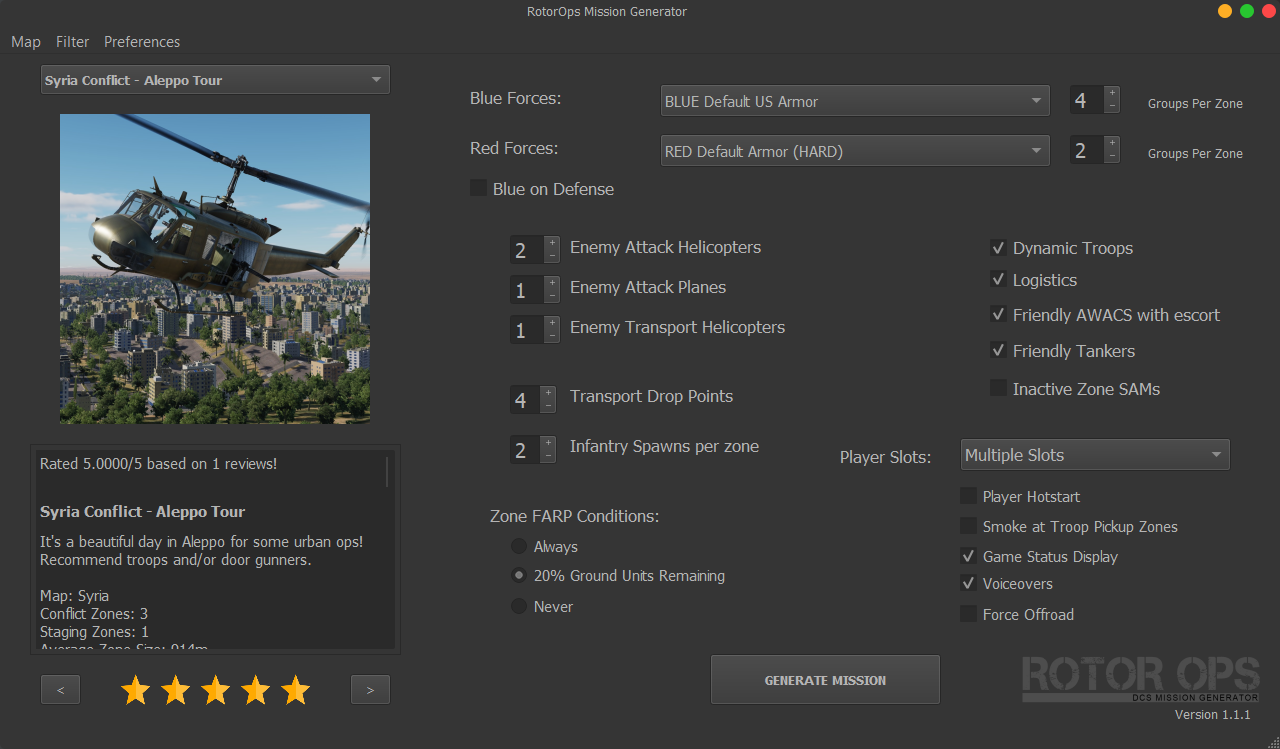
Unique helicopter-focused gameplay.
-
Mission Generator windows app.
-
Over 100 built-in voiceovers (or for use in mission customization via trigger actions).
-
Splash Damage 2 script for more realistic explosions that no longer require direct hits.
-
CTLD troop and logistics transport automatically integrated and enhanced with sound effects.
-
Play the role of the attacking or defending force.
-
Single-player and multiplayer slot creation.
Demo Missions
RotorOps: Aleppo Under Siege https://www.digitalcombatsimulator.com/en/files/3320079/
Rota Landing (Mr. Nobody) https://www.digitalcombatsimulator.com/en/files/3320186/
RotorOps: Conflict
Conflict is a game type in which attacking forces must clear Conflict Zones of defending ground forces. Once a zone is cleared, the next zone is activated and attacking ground vehicles will move to the next Conflict Zone automatically.

Dynamic Roles
A RotorOps Conflict mission has opportunities for a variety of roles and tasks. There's no need to artificially select these roles, as the mission is fully dynamic.
CAS:
The attacking side starts with ground units that move progressively through enemy conflict zones, seeking out enemy units within each zone. Protecting our ground forces is essential for establishing forward bases for rearming, troop pickup, and winning the battle.
Troop Transport:
Never before has infantry been so important in DCS! Pick up troops from the staging area or a cleared conflict zone and deliver them to the active conflict zone. They will move through the zone until no enemies remain (or until they are killed). Very useful for flushing out enemy infantry and vehicles in densely forested or urban areas. JTAC units can mark important targets with smoke and laser.
Transport Logistics:
CTLD logistics crates are available from your starting base or staging zone. The logistics area has several logistics containers, that can themselves be moved to a new area via DCS inbuilt sling loading. If you can get one of these containers to a new area safely, it becomes a CTLD logistics zone for spawning crates to build ground units and air defenses.
Ground Attack:
Destroy enemy vehicles and infantry to ensure the survival of our own ground units. Clearing conflict zones of enemy units is essential for establishing forward bases for rearming and refueling. All enemy ground units must be destroyed to win the battle!
Fixed-wing CAP/CAS:
Enemy attack helicopters and planes are optional in the generator. Add slots in the mission generator for fixed-wing flights to provide cover for our helicopters and ground units. For a unique challenge, try Defense mode in a fixed-wing ground attack role...enemies are nearly always in motion.
Mission Generator and Customization
The mission generator works by automatically placing units and trigger actions into a map template with defined airports and trigger zones.
Missions produced by the generator are easy to modify and understand. For example, units can be moved, and player flights can be added without issue. Use the result of the mission generator for quick plays, or build on it for something epic. Trigger actions are set up, labeled, and commented so that you can understand how things work and add your own actions. An additional library of voiceover files is provided for your own use.
Easily add your own templates for friendly/enemy ground units directly in the DCS mission editor.
Create your own scenarios for the RotorOps mission generator, using the DCS mission editor.
Developers
We welcome contributors to this new project! Please get in touch on Discord with new ideas or pickup/create an issue in this repo.
RotorOps Mission Creator Guide:
For more detailed information on how the script works, see this wiki: https://github.com/spencershepard/RotorOps/wiki/RotorOps:-Mission-Creator-Guide
Thanks to
RotorOps uses MIST and integrates CTLD:
https://github.com/mrSkortch/MissionScriptingTools
https://github.com/ciribob/DCS-CTLD
The mission generator would not be possible without PyDCS:
Thanks to contributors
Shagrat: For amazing templates and testing for our FARPs, FOBs, and other mission assets.
Mr. Nobody: For awesome scenario and forces templates and helping to indroduce the DCS world to RotorOps.
Join our Discord!
Chat about anything RotorOps or join up to fly!
Support this project on Patreon
Any membership level is a huge help to push this project forward, including our goals for new features and a full-time multiplayer server. Thank you!