
Vulkan
A Music Discord Bot, that plays Youtube, Spotify, Deezer links or raw queries. Vulkan is open source, so everyone can fork this project, follow the instructions and use it in their own way, executing it in your own machine or hosting in others machines to work 24/7.
Vulkan uses multiprocessing and asynchronous Python modules to maximize Music Player response time, so the player doesn't lag when many commands are being processed and it can play in multiples discord serves at the same time without affecting the Music Player response time.
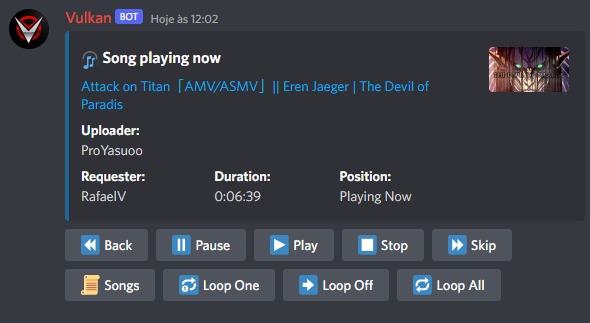
Music 🎧
- Play musics from Youtube, Spotify and Deezer links (Albums, Artists, Playlists and Tracks).
- Play musics in multiple discord server at the same time.
- The player contains buttons to shortcut some commands.
- Manage the loop of one or all playing musics.
- Manage the order and remove musics from the queue.
- Shuffle the musics queue order.
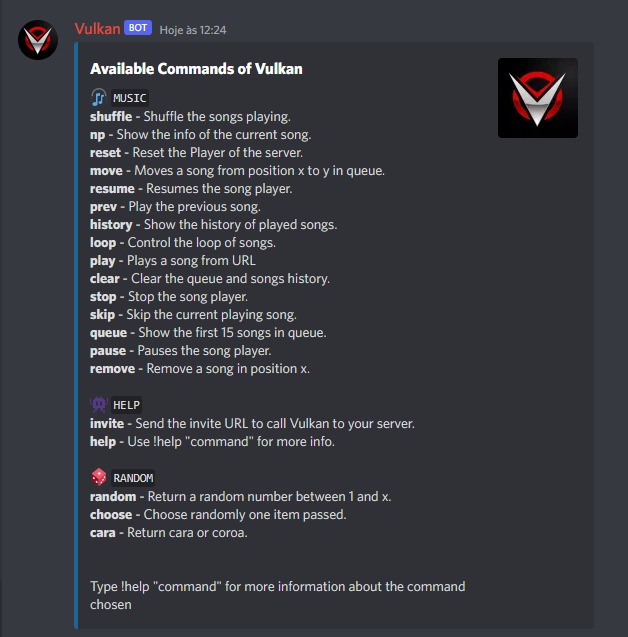
How to use it
Requirements
Installation of Python 3.8+ and the dependencies in the requirements.txt file, creation of your own Bot in Discord and Spotify Keys.
pip install -r requirements.txt
🔑 API Keys
You have to create your own discord Bot and store your Bot Token
-
Your Discord Application - Discord
-
You own Spotify Keys - Spotify
- This information must be stored in an .env file, explained further.
Installation of FFMPEG
FFMPEG is a module that will be used to play music, you must have this configured in your machine
FFMPEG must be configured in the PATH for Windows users. Check this YoutubeVideo.
You can download the executables in this link https://www.ffmpeg.org/download.html and then put the .exe files inside a ffmpeg\bin folder in your C:\ folder. Do not forget to add 'ffmpeg\bin' to your PATH.
.Env File Example
This is an example of how your .env file (located in root) should look like.
BOT_TOKEN=Your_Own_Bot_Token
SPOTIFY_ID=Your_Own_Spotify_ID
SPOTIFY_SECRET=Your_Own_Spotify_Secret
BOT_PREFIX=Your_Wanted_Prefix_For_Vulkan
⚙️ Configs
The config file is located at ./config/Configs.py, it doesn't require any change, but if you can change values to the way you want.
Initialization
- Go to Discord and invite your Bot to your own server
- Run
python main.pyin console to start
🚀 Heroku
To deploy and run your Bot in Heroku 24/7, follow the instructions in the Heroku Instructions page.
🧪 Tests
The tests were written manually with no package due to problems with async function in other packages, to execute them type in root:
python run_tests.py
📖 License
This program is free software: you can redistribute it and/or modify it under the terms of the MIT License.
🏗️ Contributing
If you are interested in upgrading this project i will be very happy to receive a PR or Issue from you. See TODO project to see if i'm working in some feature now.