DMS with decimal seconds is what the hornet uses for PP targest. In the
future we'll want to make this aircraft specific (and potentially user
preference for jets like the A-10 that can handle both L/L and MGRS).
We don't need to include a SEAD flight in missions against EWRs or SAMs
that no longer have a radar.

Also plan DEAD missions against air defenses that have no radars.
Previously we would never finish killing launcher only sites (which
cannot defend any more, but are cheaper to return to working order than
a fully destroyed site) nor would we plan DEAD against IR SAMs or AAA.
We were setting up all the correct *target* waypoints but the AI doesn't
use the target waypoints; they use the targets property of the ingress
waypoint. This meant that the flight plan looked correct in the UI and
was correct for players but the tasks were set up incorrectly for the AI
because building TGOs are aggravatingly multiple TGOs with the same name
in the implementation.

Mission targets now enumerate their own strike targets so that this
mistake is harder to make in the future.

This won't be perfect, the AI is still not able to parallelize tasks and
since buildings aren't groups they can only attack one structure at a
time, but they'll now at least switch to the next target after hitting
the first one.

As a bonus, stop bombing the dead buildings.

Fixes https://github.com/dcs-liberation/dcs_liberation/issues/235
Fixes https://github.com/dcs-liberation/dcs_liberation/issues/244
This really needs to be a proper type, but this is a start: create new
categories for the types of TGOs that are missing. This removes some
icon special cases.
These are an implementation quirk, and passing them to the UI just means
that we put TGO pins on top of the CP, which makes the base menu
unopenable.

In the old UI we avoided this by not drawing anything that was
`for_airbase`, but now that we can zoom in further we're drawing base
defenses.
This PR allows campaign creators to incorporate map objects (referred to as Scenery in the code) into their Liberation campaign.
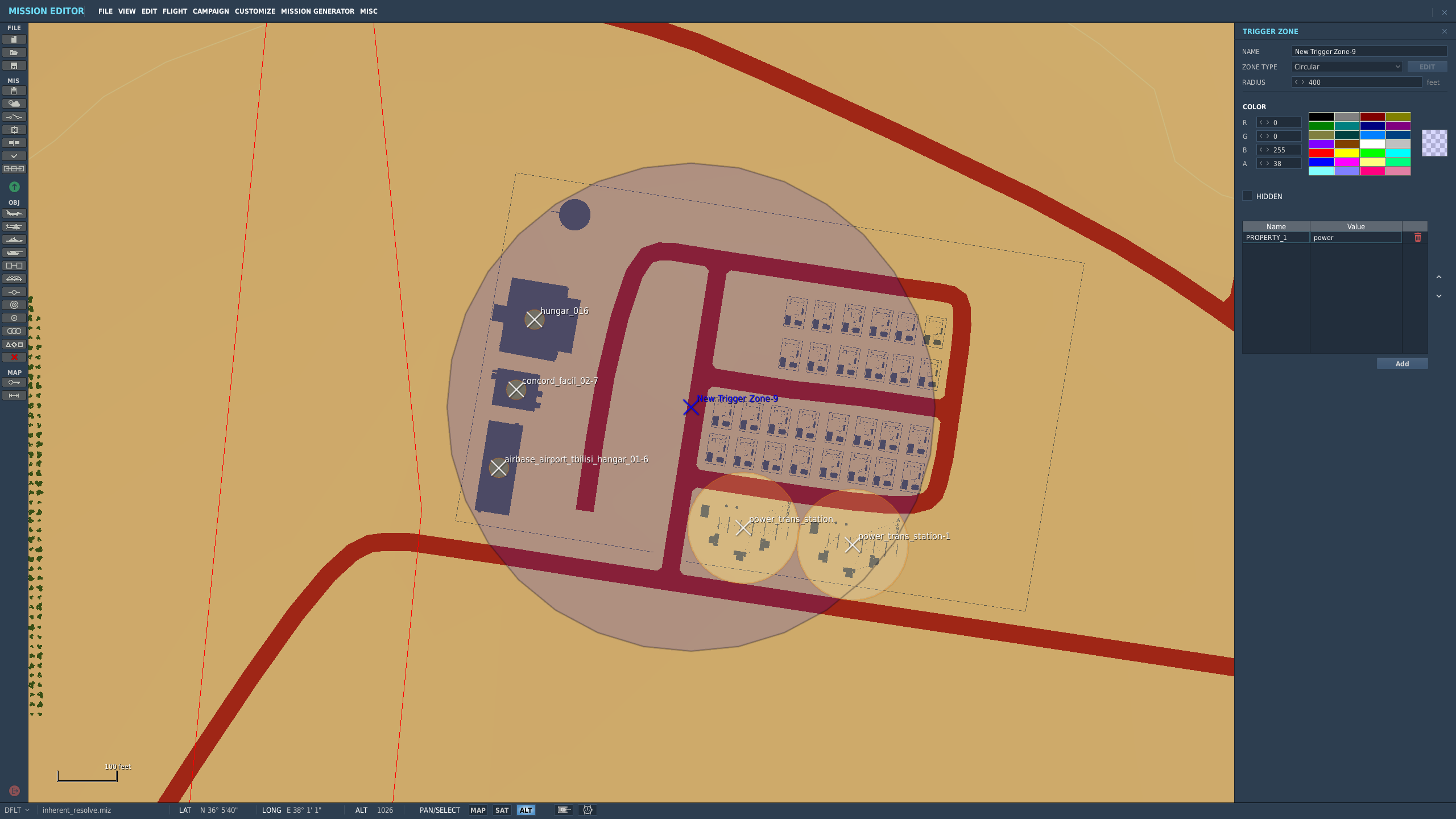
Map objects are defined using white trigger zones created by right clicking on scenery and clicking `assign as...`. Objective groups are defined by creating a blue TriggerZone surrounding the centers of the white trigger zones. The type of objective is determined by the campaign creator, assigning the value of the first property of the blue TriggerZone with the objective type.
Map objects maintain their visually dead state by assigning a `Mission Start` `Scenery Object Dead` trigger to the trigger zone. It is important for the Liberation generated TriggerZone to be as small as possible so that no other scenery is marked dead by DCS.
TriggerZones are hidden during gameplay (DCS behavior. I don't know if it's possible to turn that off.) TriggerZones are visible in the mission editor and mission planner however. If a player is using an older plane, it is important for them to remember where the target is.
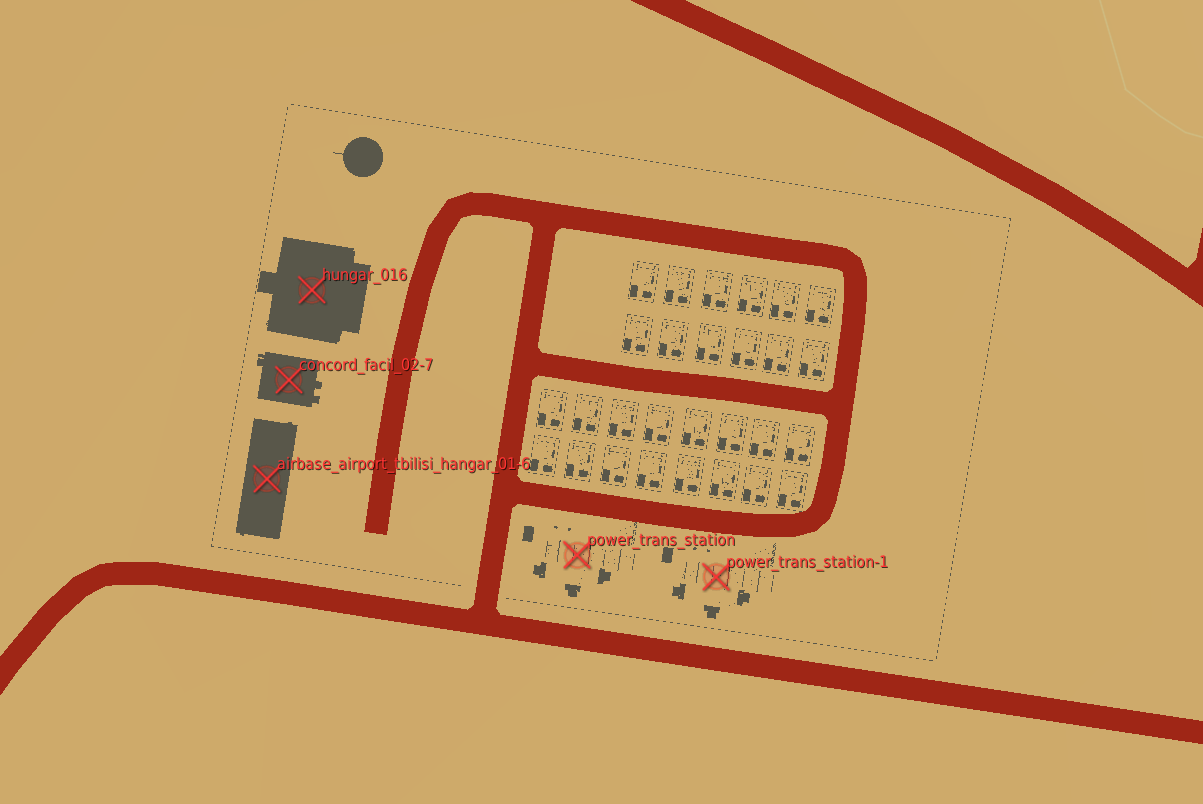
In the mission planner, the trigger zones' will be blue or red depending on which faction the map objects belong to.
Inherent Resolve campaign has been modified to integrate scenery objects.
### **Limitations:**
- Objective definitions (Any Blue TriggerZones) in campaign definition cannot overlap.
- Map object deaths in `state.json` is tracking integers. You won't know what died until debriefing.
- No images for the various buildings. In theory it can be done, but an unreasonable amount of work.
- Every blue trigger zone must have a unique name. (If you let DCS auto increment the names this is not a concern.
- No output to screen when scenery object is dead. You can see the building drawn as dead in the F10 map though.
### **Pictures:**
An objective:
How the objective looks once in the mission planner/editor. This objective belongs to the enemy faction:
The `FactoryGroundObject` is just a special case of
`BuildingGroundObject` that we maybe don't actually need. For now it
provides some special case logic for the layout, but this allows any TGO
with the "factory" category to behave as a ground unit source.

Note that the "factory" random strike targets are *not* generated
anymore, so this doesn't affect campaign design currently.
The routes do not need be be recreated each time we create a
`FrontLine`. The front lines follow the convoy routes, which are static.
Add the convoy route data to the `ControlPoint` the way we do for
shipping lanes and have `FrontLine` load the data from there.
A was intended to be the blue point and B was intended to be the red
point. Make this a part of the name so that's clear, and clean up
related code to keep that reliable.
Some of the objective locations for the starting front line are too
aggressive and put opfor at a disadvantage since blue ships might start
so close to their bases.
Removing the per-transit type supply routes allows us to find the best
route from A to B even if the unit needs to switch transit modes along
the way.

The "best" route is the one that will generate better gameplay. That is,
convoys are preferred to ships (use cases for GMT are rare in DCS), and
ships are preferred to airlift (reasons to attack cargo ships are also
rare). Avoiding airlift is also a good strategic choice generally since
it consumes aircraft that could be performing other missions.

The extreme weight against airlift in the pathfinding algorithm could
probably be scaled way down so that airlift would be given preference
over a very long trip, possibly only for urgent transfers.

Later when we add rail that will probably be given the most preference,
but possibly between road and shipping.

https://github.com/Khopa/dcs_liberation/issues/823
The simple form of this works, but without the multi-mode routing it'll
only get used when the final destination is a port with a link to a port
with a factory.

These also aren't targetable or simulated yet.

https://github.com/Khopa/dcs_liberation/issues/826
Downside to the current implementation is that whether or not transports
that were purchased last turn will be available for airlift this turn is
arbitrary. This is because transfers are created at the same time as
units are delivered, and units are delivered in an arbitrary order per
CP. If the helicopters are delivered before the ground units they'll
have access to the transports, otherwise they'll be refunded. This will
be fixed later when I rework the transfer requests to not require
immediate fulfillment.

https://github.com/Khopa/dcs_liberation/issues/825
Historically this inherited from Event but there was no reason for that.
That's gone now. Finish the separation and move the unit order tracking
class out of the combat results reaction class's file.
The previous flight plan only makes sense if the convoy will make it a
significant distance from its starting point. At road speeds over the
typical mission duration this is not true, so we can actually plan this
as if it was a strike mission near the origin point and that's close
enough.

There's some cleanup work to do here that I've added todos for.

Fixes https://github.com/Khopa/dcs_liberation/issues/996
This currently is only supported for player flights. I have no idea how
to create an AI flight plan that won't just get them killed. AI-only BAI
missions against supply routes will warn the player on mission creation.
A CP with a factory would be able to supply itself, but was not in a
supply route if it was the only connected friendly CP. When the player
starts with only one base against an enemy base this meant that it was
in no supply route, causing it to not be a recruitment location or a
place to buy more than a reserve of vehicles automatically.


