- factor out own class for the iadsnetwork within the conflicttheater
- This class will handle all Skynet related things - no specific group_name handling necessary in future
- make iadsbuilding own TGO class because SAM & EWRs are Vehicle Groups. IADS Elements dont have any groups attached.
- added command center, connection node and power source as Ground objects which can be added by the campaign designer
- adjust lua generator to support new iads units
- parse the campaign yaml to get the iads network information
- use the range as fallback if no yaml information was found
- complete rewrite of the skynet lua script
- allow destruction of iads network to be persistent over all rounds
- modified the presetlocation handling: the wrapper PresetLocation for PointWithHeading now stores the original name from the campaign miz to have the ability to process campaign yaml configurations based on the ground unit
- Implementation of the UI representation for the IADS Network
- Give user the option to enable or disable advanced iads
- Extended the layout system: Implement Sub task handling to support PD
This allows unique identification across saves. The front-end needs to
be able to differentiate the first carrier in game A and the first
carrier in game B, but because carriers (and other non-airfield CPs) are
assigned IDs sequentially, collisions were to be expected. The front-end
can't tell the difference between a reloaded game and a new turn, so we
need to ensure different IDs across games.

This is a handy cleanup anyway, since callers constructing CPs no longer
need to manually track the CP ID counter.

Fixes https://github.com/dcs-liberation/dcs_liberation/issues/2078.
The UI needs to be able to identify these to the server and vice versa,
so they'll need IDs that don't change. Rather than constructing an ID
based on the control points names, make them an owned part of the
control point. The constructed ID would be fine, but a UUID will make
them more suitable for the database, and this was always fairly gross
anyway.

Some follow up work if anyone is interested: a bunch of the data that's
computed in the various properties can now probably be computed *once*
and persisted to the FrontLine type.
This is briefly moving us over to my fork of pydcs while we wait for
https://github.com/pydcs/dcs/pull/206 to be merged. The adaptation is
invasive enough that I don't want it lingering for long.
- completly refactored the way TGO handles groups and replaced the usage of the pydcs ground groups (vehicle, ship, static) with an own Group and Unit class.
- this allows us to only take care of dcs group generation during miz generation, where it should have always been.
- We can now have any type of unit (even statics) in the same logic ground group we handle in liberation. this is independent from the dcs group handling. the dcs group will only be genarted when takeoff is pressed.
- Refactored the unitmap and the scenery object handling to adopt to changes that now TGOs can hold all Units we want.
- Cleaned up many many many lines of uneeded hacks to build stuff around dcs groups.
- Removed IDs for TGOs as the names we generate are unique and for liberation to work we need no ids. Unique IDs for dcs will be generated for the units and groups only.
* Addresses #478, adding a heading class to represent headings and angles
Removed some unused code

* Fixing bad merge

* Formatting

* Fixing type issues and other merge resolution misses
This is as much as we can do until pydcs actually adds the py.typed
file. Once that's added there are a few ugly monkey patching corners
that will just need `# type: ignore` for now, but we can't pre-add those
since we have mypy warning us about superfluous ignore comments.
* Implements #1399

* Reverting accidental change in generate_landmap.py

* Changelog update

* Import beacon data for Marianas.

Co-authored-by: Dan Albert <dan@gingerhq.net>
This limit is determined by the number of buildings that belong to Ammo
Depots at the front line's connected Control Point. The limit increases
for every surviving building at ammo depot objectives.

There is a lower limit to the number of units that will spawn, so that
if there are no surviving ammo depot buildings at a control point, there
will still be some ground conflict.
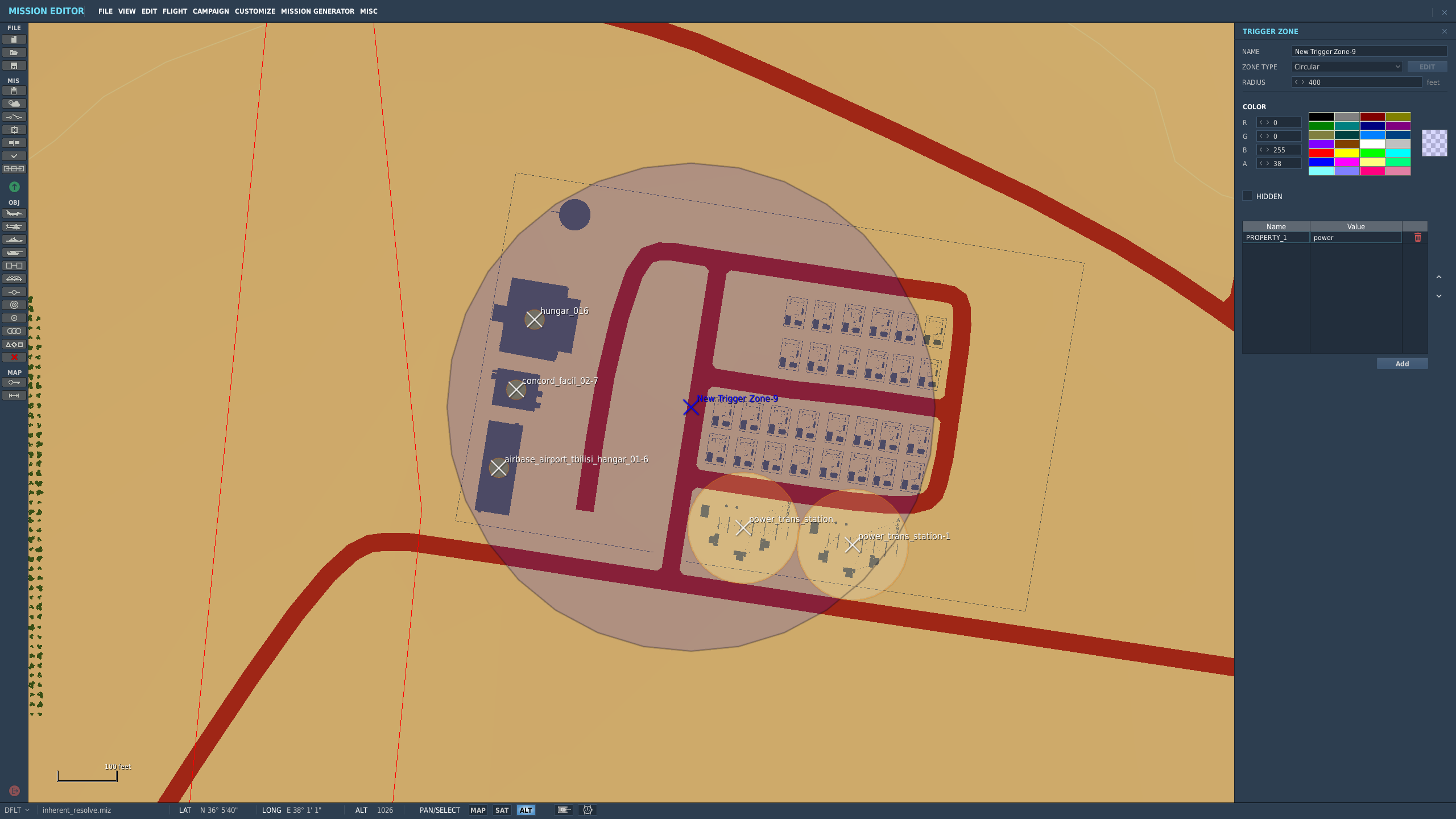
This PR allows campaign creators to incorporate map objects (referred to as Scenery in the code) into their Liberation campaign.
Map objects are defined using white trigger zones created by right clicking on scenery and clicking `assign as...`. Objective groups are defined by creating a blue TriggerZone surrounding the centers of the white trigger zones. The type of objective is determined by the campaign creator, assigning the value of the first property of the blue TriggerZone with the objective type.
Map objects maintain their visually dead state by assigning a `Mission Start` `Scenery Object Dead` trigger to the trigger zone. It is important for the Liberation generated TriggerZone to be as small as possible so that no other scenery is marked dead by DCS.
TriggerZones are hidden during gameplay (DCS behavior. I don't know if it's possible to turn that off.) TriggerZones are visible in the mission editor and mission planner however. If a player is using an older plane, it is important for them to remember where the target is.
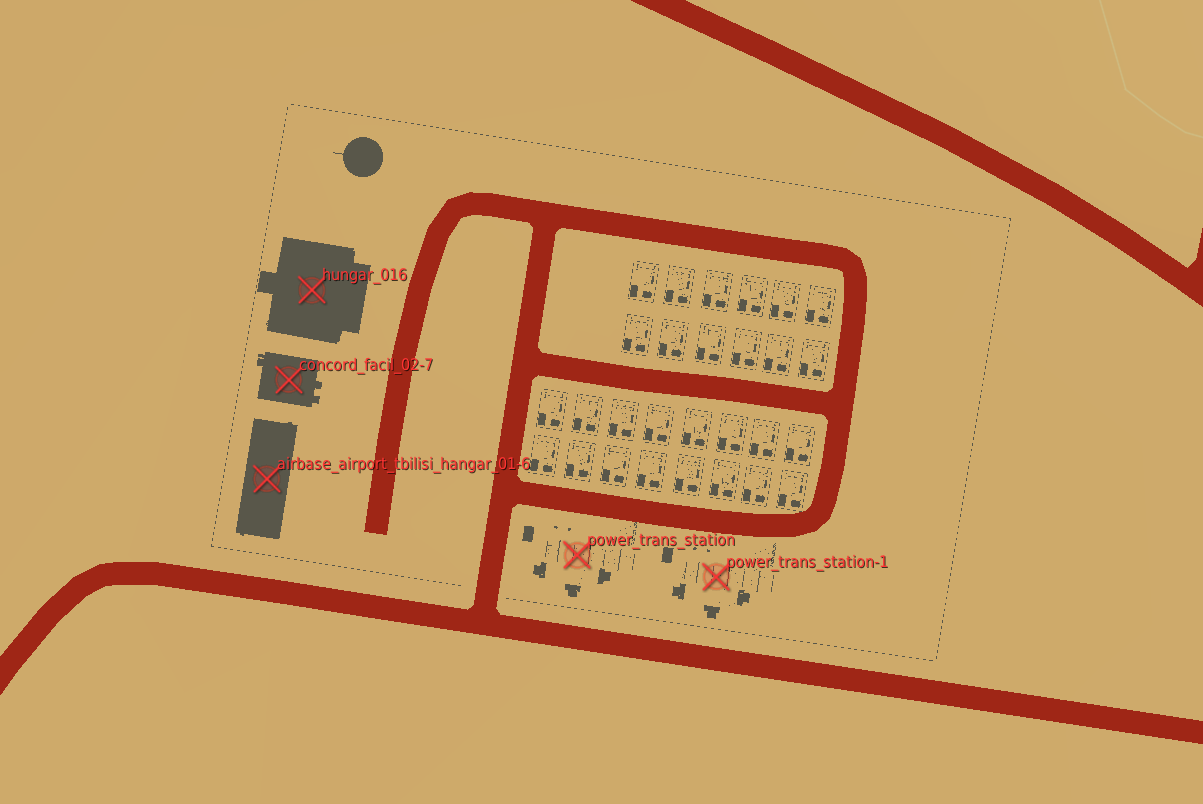
In the mission planner, the trigger zones' will be blue or red depending on which faction the map objects belong to.
Inherent Resolve campaign has been modified to integrate scenery objects.
### **Limitations:**
- Objective definitions (Any Blue TriggerZones) in campaign definition cannot overlap.
- Map object deaths in `state.json` is tracking integers. You won't know what died until debriefing.
- No images for the various buildings. In theory it can be done, but an unreasonable amount of work.
- Every blue trigger zone must have a unique name. (If you let DCS auto increment the names this is not a concern.
- No output to screen when scenery object is dead. You can see the building drawn as dead in the F10 map though.
### **Pictures:**
An objective:
How the objective looks once in the mission planner/editor. This objective belongs to the enemy faction:
The routes do not need be be recreated each time we create a
`FrontLine`. The front lines follow the convoy routes, which are static.
Add the convoy route data to the `ControlPoint` the way we do for
shipping lanes and have `FrontLine` load the data from there.


