 8827f7df34
* Move the UI code out of the plugin logic.
* Add types where needed.
* Move into game package.
* Improve error handling.
* Simplify settings behavior.
* Don't load disabled plugins.
* Remove knowledge of non-base plugins from game generation.

Fixes https://github.com/Khopa/dcs_liberation/issues/311
3.3 KiB
LUA Plugin system
This plugin system was made for injecting LUA scripts in dcs-liberation missions.
The resources for the plugins are stored in the resources/plugins folder ; each plugin has its own folder.
How does the system work ?
The application first reads the resources/plugins/plugins.json file to get a list of plugins to load, in order.
Each entry in this list should correspond to a subfolder of the resources/plugins directory, where a plugin.json file exists.
This file is the description of the plugin.
plugin.json
The base and jtacautolase plugins both are included in the standard dcs-liberation distribution.
You can check their respective plugin.json files to understand how they work.
Here's a quick rundown of the file's components :
skipUI: if true, this plugin will not appear in the plugins selection user interface. Useful to force a plugin ON or OFF (see the base plugin)nameInUI: the title of the plugin as it will appear in the plugins selection user interface.defaultValue: the selection value of the plugin, when first installed ; if true, plugin is selected.specificOptions: a list of specific plugin optionsnameInUI: the title of the option as it will appear in the plugins specific options user interface.mnemonic: the short, technical name of the option. It's the name of the LUA variable passed to the configuration script, and the name of the option in the application's settingsdefaultValue: the selection value of the option, when first installed ; if true, option is selected.
scriptsWorkOrders: a list of work orders that can be used to load or disable loading a specific LUA scriptfile: the name of the LUA file in the plugin folder.mnemonic: the technical name of the LUA component. The filename may be more precise than needed (e.g. include a version number) ; this is used to load each file only once, and also to disable loading a filedisable: if true, the script will be disabled instead of loaded
configurationWorkOrders: a list of work orders that can be used to load a configuration LUA script (same description as above)
Standard plugins
The base plugin
The base plugin contains the scripts that are going to be injected in every dcs-liberation missions. It is mandatory.
The JTACAutolase plugin
This plugin replaces the vanilla JTAC functionality in dcs-liberation.
Known third-party plugins
Plugins not included with Liberation can be installed by adding them to the
resources/plugins directory and listing them in
resources/plugins/plugins.json. Below is a list of other plugins that can be
installed:
Custom plugins
The easiest way to create a custom plugin is to copy an existing plugin, and modify the files.
New settings pages
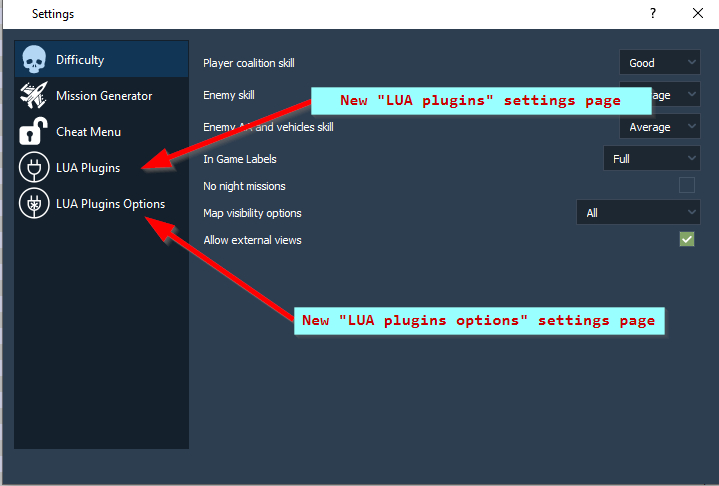
Custom plugins can be enabled or disabled in the new LUA Plugins settings page.

For plugins which expose specific options (such as "use smoke" for the JTACAutoLase plugin), the LUA Plugins Options settings page lists these options.
