mirror of
https://github.com/dcs-liberation/dcs_liberation.git
synced 2025-11-10 14:22:26 +00:00
 a53a648a63
This Pull Request lets users plan Tanker flights.

Features:

- Introduction of `Refueling` flight type.
- Tankers can be purchased at airbases and carriers.
- Tankers get planned by AI.
- Tankers are planned from airbases and at aircraft carriers.
- Tankers aim to be at high, fast, and 70 miles from the nearest threat.
  (A10s won't be able to tank)
- Tankers racetrack orbit for one hour.
- Optional Tickbox to enable legacy tankers.
- S-3B Tanker added to factions.
- KC-130 MPRS added to factions.
- Kneeboard shows planned tankers, their tacans, and radios.

Limitations:

- AI doesn't know whether to plan probe and drogue or boom refueling
  tankers.
- User can't choose tanker speed.  Heavily loaded aircraft may have
  trouble.
- User can't choose tanker altitude.  A-10s will not make it to high
  altitude.

Problems:

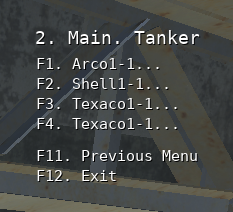
- Tanker callsigns do not increment, see attached image.  (Investigated:
  Need to use `FlyingType.callsign_dict`, instead of just
  `FlyingType.callsign`.  This seems like it might be significant work
  to do.).
- Having a flight of two or more tankers only spawns one tanker.
- Let me know if you have a solution, or feel free to commit one.

https://user-images.githubusercontent.com/74509817/120909602-d7bc3680-c633-11eb-80d7-eccd4e095770.png
In this folder are icons for the different units in DCS / DCS Liberation.
How were these retrieved :
- I took screenshoot of the units from the encyclopedia in DCS. If you want to add more pictures, please do the same, so that the units have the same background.
- Then resized all the image so that have static size. Aspect ratio is not perfect, but it's hard to notice on such small image.
import os
from PIL import Image

for img_name in os.listdir("."):
	if os.path.isfile(img_name) and img_name.endswith(".png"):
		print(img_name)
		img = Image.open(img_name)
		img = img.resize((64,24), Image.ANTIALIAS)
		img.save('./out/' + img_name[:-4] + "_24.jpg")
You need PIL to run the script :
pip install PIL
If you want access to get my high res screenshoot, i still have them, but to reduce size and ram usage, i believe it's better to use super small jpg icons instead.
@Khopa