Module Event
This core module models the dispatching of DCS Events to subscribed MOOSE classes, following a given priority.
1) Event Handling Overview

Within a running mission, various DCS events occur. Units are dynamically created, crash, die, shoot stuff, get hit etc. This module provides a mechanism to dispatch those events occuring within your running mission, to the different objects orchestrating your mission.
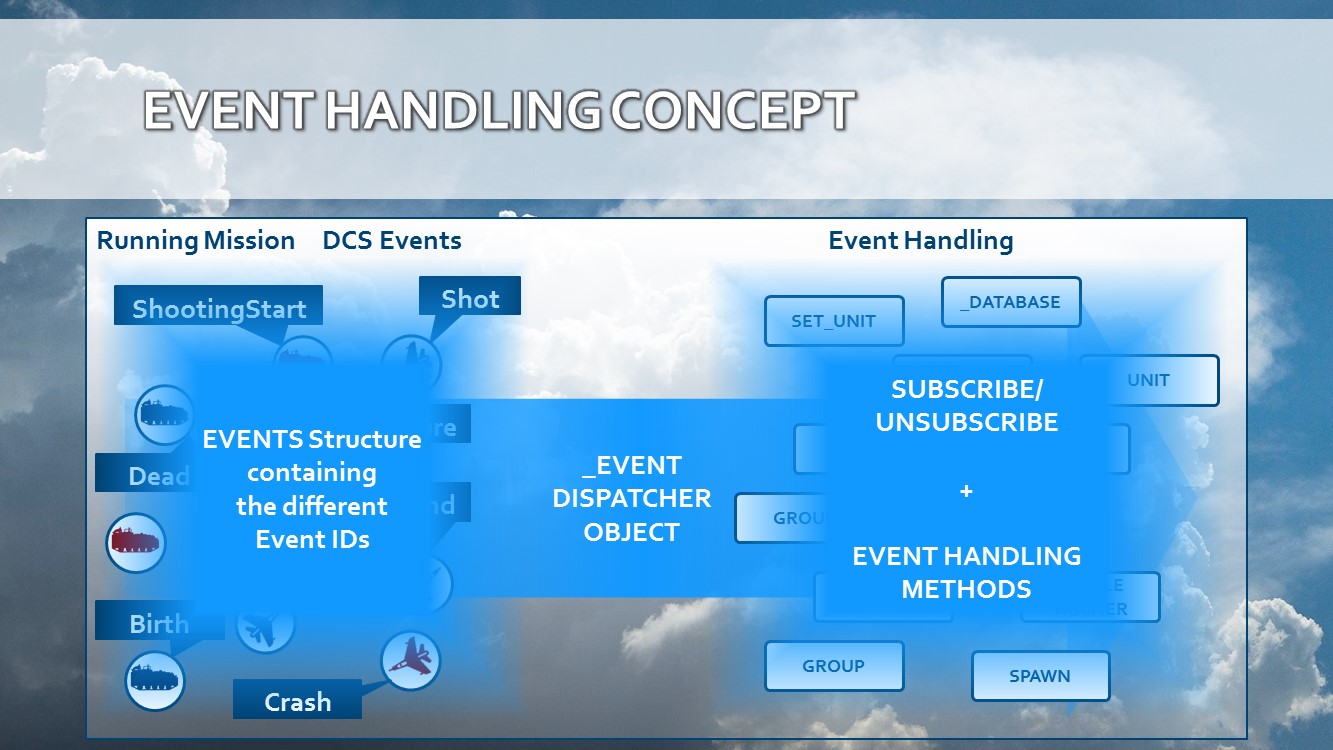
Objects can subscribe to different events. The Event dispatcher will publish the received DCS events to the subscribed MOOSE objects, in a specified order. In this way, the subscribed MOOSE objects are kept in sync with your evolving running mission.
1.1) Event Dispatching

The _EVENTDISPATCHER object is automatically created within MOOSE, and handles the dispatching of DCS Events occurring in the simulator to the subscribed objects in the correct processing order.
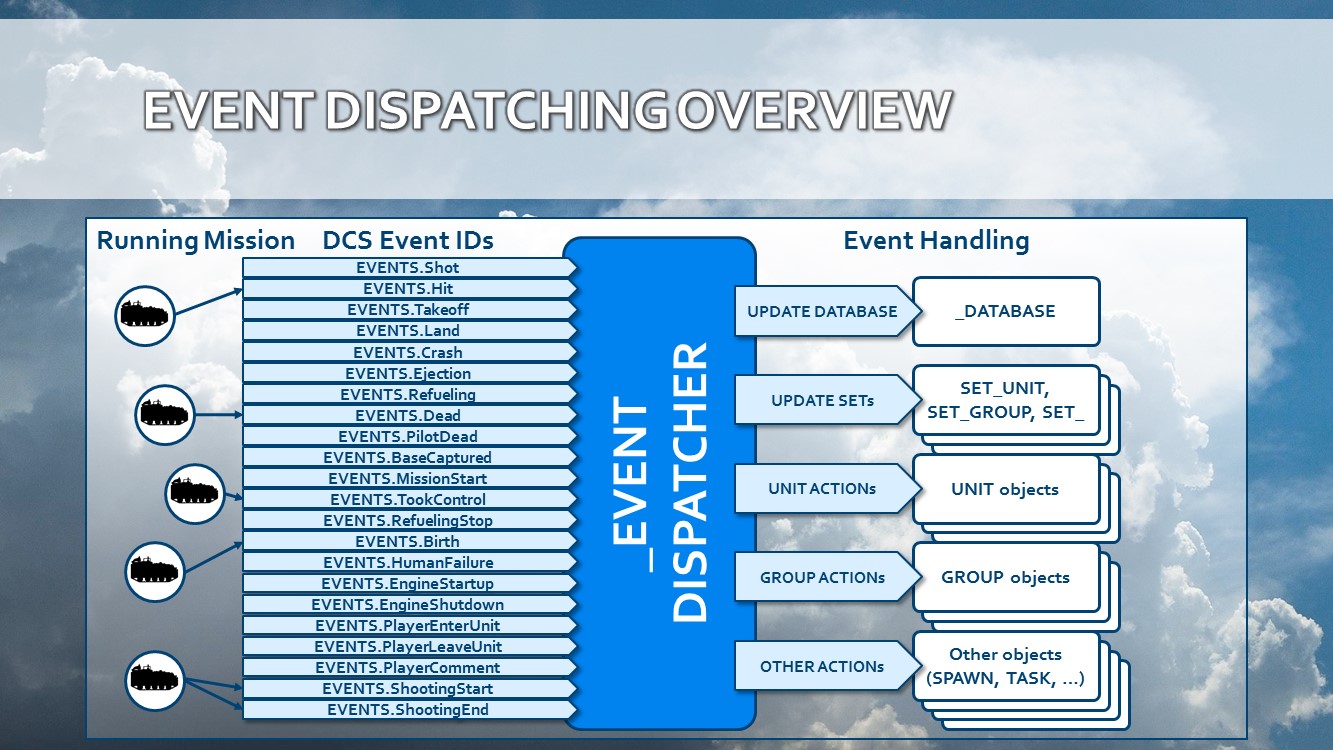
There are 5 levels of kind of objects that the _EVENTDISPATCHER services:
- _DATABASE object: The core of the MOOSE objects. Any object that is created, deleted or updated, is done in this database.
- SET_ derived classes: Subsets of the _DATABASE object. These subsets are updated by the _EVENTDISPATCHER as the second priority.
- UNIT objects: UNIT objects can subscribe to DCS events. Each DCS event will be directly published to teh subscribed UNIT object.
- GROUP objects: GROUP objects can subscribe to DCS events. Each DCS event will be directly published to the subscribed GROUP object.
- Any other object: Various other objects can subscribe to DCS events. Each DCS event triggered will be published to each subscribed object.
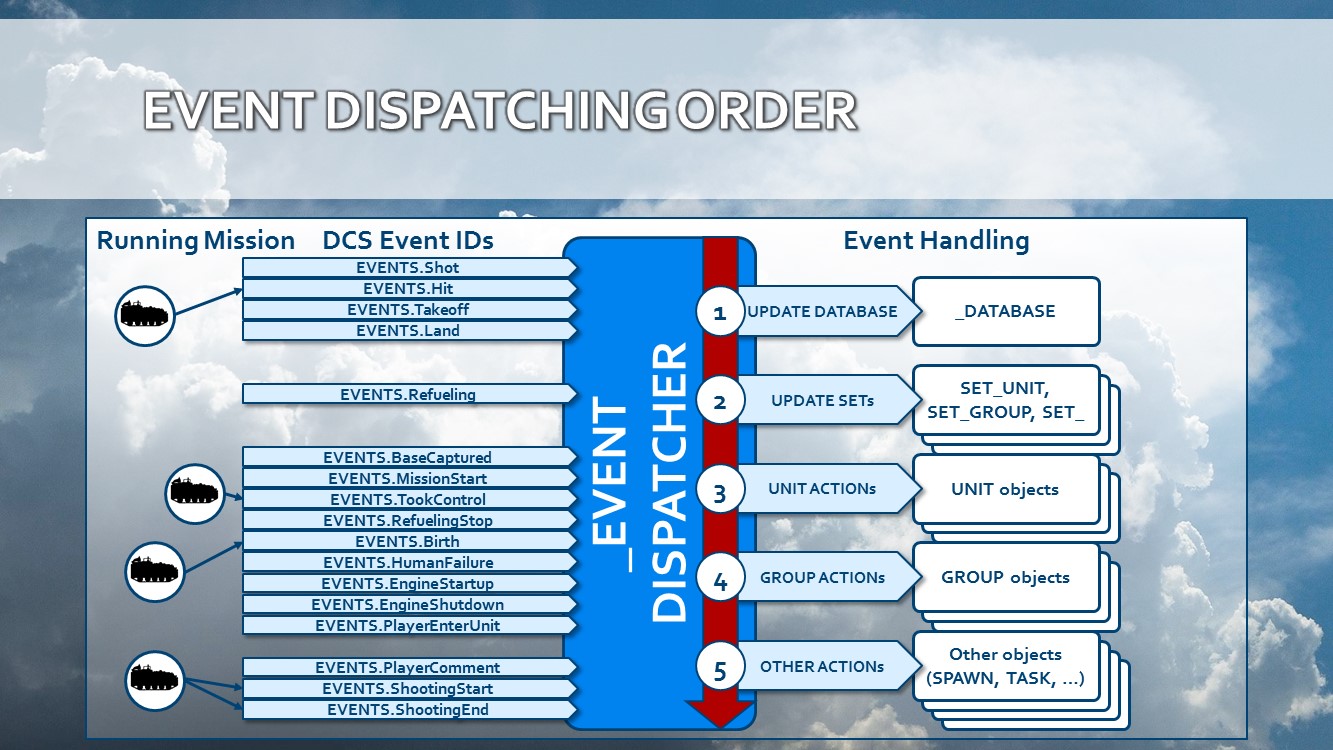
For most DCS events, the above order of updating will be followed.1
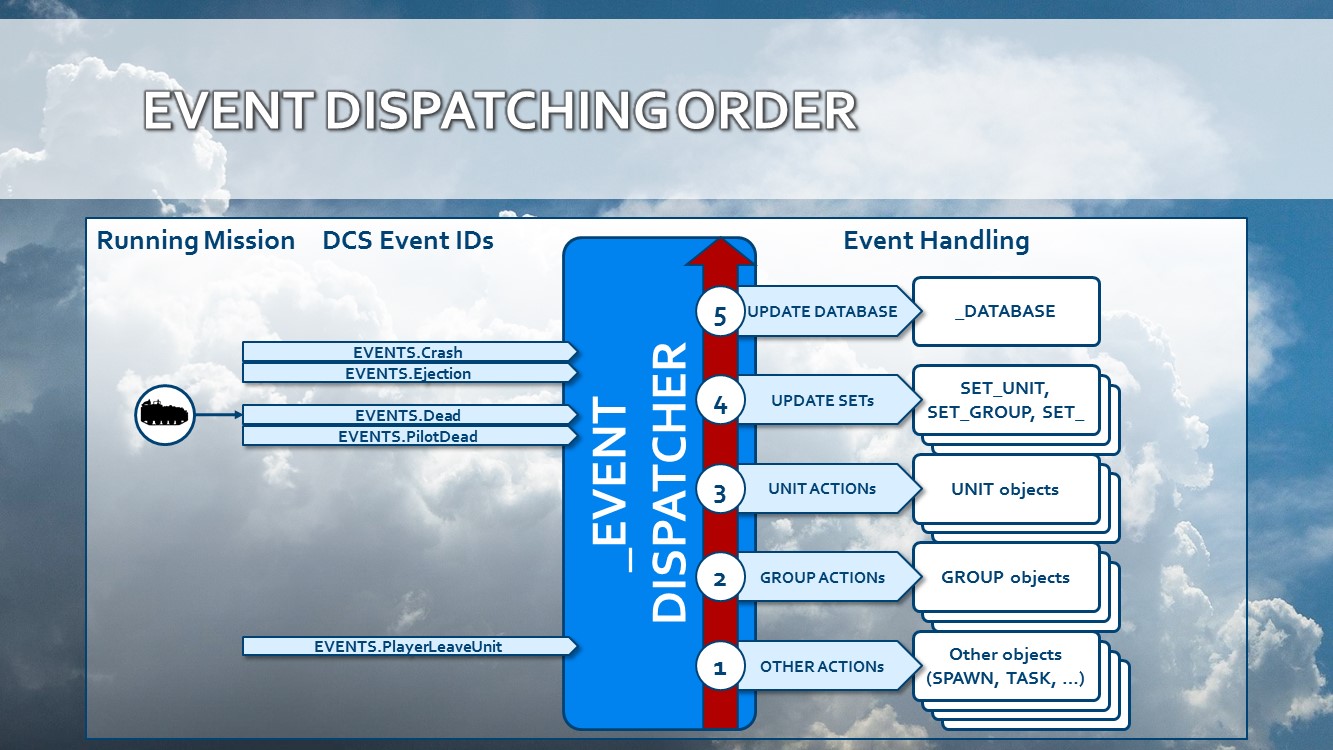
But for some DCS events, the publishing order is reversed. This is due to the fact that objects need to be erased instead of added.
1.2) Event Handling
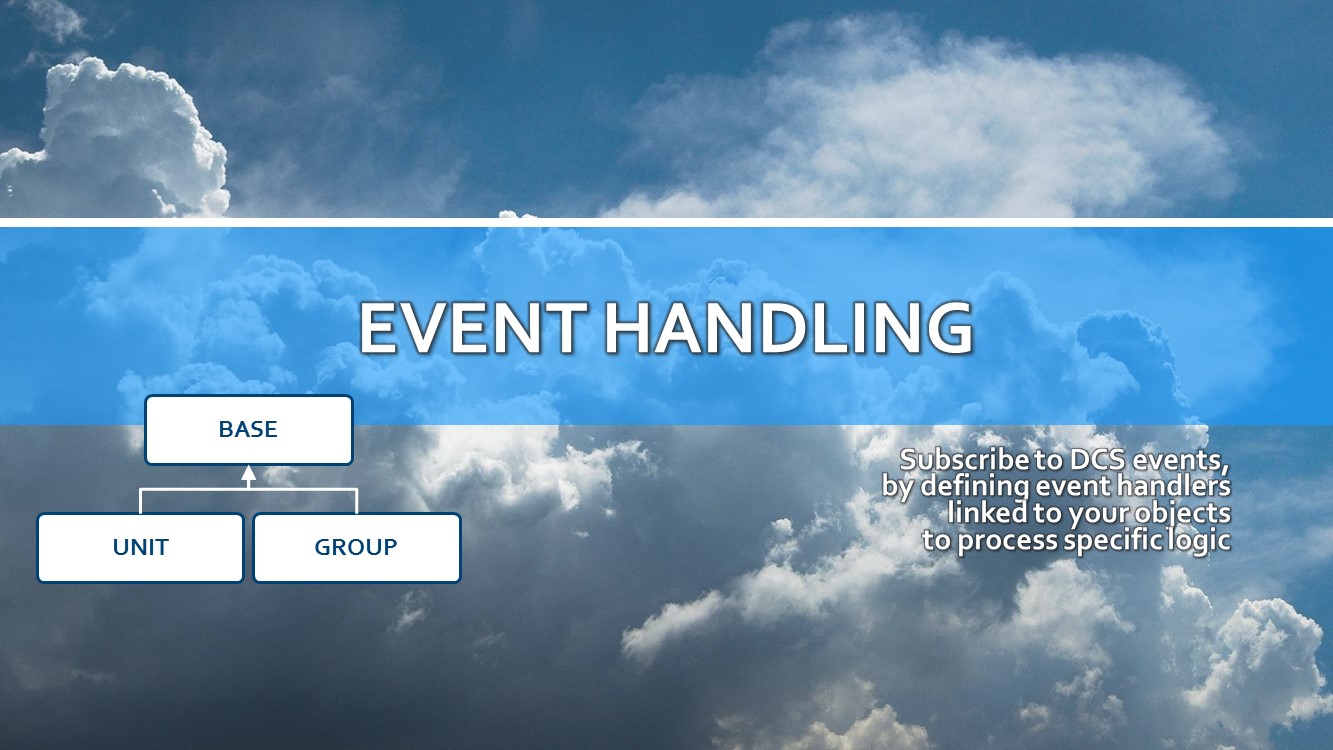
The actual event subscribing and handling is not facilitated through the _EVENTDISPATCHER, but it is done through the BASE class, UNIT class and GROUP class. The _EVENTDISPATCHER is a component that is quietly working in the background of MOOSE.
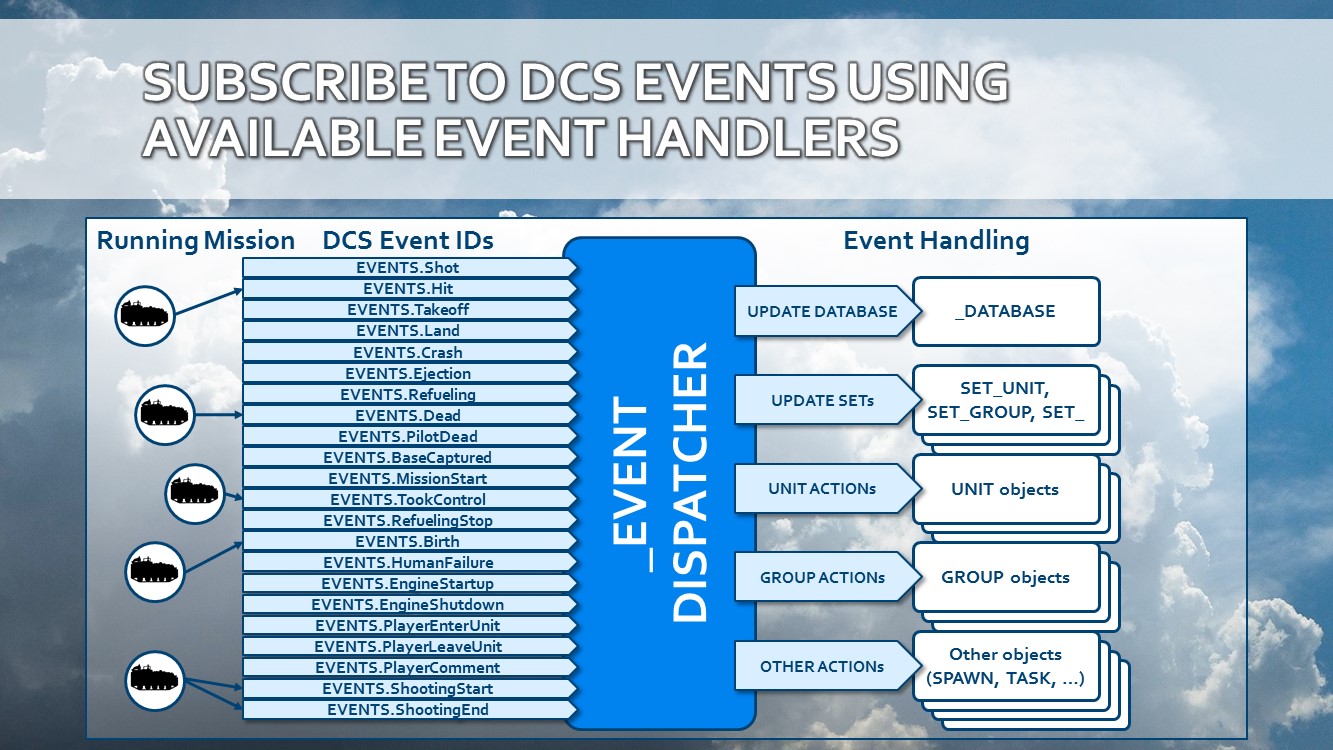
The BASE class provides methods to catch DCS Events. These are events that are triggered from within the DCS simulator, and handled through lua scripting. MOOSE provides an encapsulation to handle these events more efficiently.
1.2.1 Subscribe / Unsubscribe to DCS Events
At first, the mission designer will need to Subscribe to a specific DCS event for the class. So, when the DCS event occurs, the class will be notified of that event. There are two functions which you use to subscribe to or unsubscribe from an event.
- Base#BASE.HandleEvent(): Subscribe to a DCS Event.
- Base#BASE.UnHandleEvent(): Unsubscribe from a DCS Event.
1.3.2 Event Handling of DCS Events
Once the class is subscribed to the event, an Event Handling method on the object or class needs to be written that will be called when the DCS event occurs. The Event Handling method receives an Event#EVENTDATA structure, which contains a lot of information about the event that occurred.
Find below an example of the prototype how to write an event handling function for two units:
 local Tank1 = UNIT:FindByName( "Tank A" )
 local Tank2 = UNIT:FindByName( "Tank B" )

 -- Here we subscribe to the Dead events. So, if one of these tanks dies, the Tank1 or Tank2 objects will be notified.
 Tank1:HandleEvent( EVENTS.Dead )
 Tank2:HandleEvent( EVENTS.Dead )

 --- This function is an Event Handling function that will be called when Tank1 is Dead.
 -- @param Wrapper.Unit#UNIT self
 -- @param Core.Event#EVENTDATA EventData
 function Tank1:OnEventDead( EventData )

   self:SmokeGreen()
 end

 --- This function is an Event Handling function that will be called when Tank2 is Dead.
 -- @param Wrapper.Unit#UNIT self
 -- @param Core.Event#EVENTDATA EventData
 function Tank2:OnEventDead( EventData )

   self:SmokeBlue()
 end
1.3.3 Event Handling methods that are automatically called upon subscribed DCS events
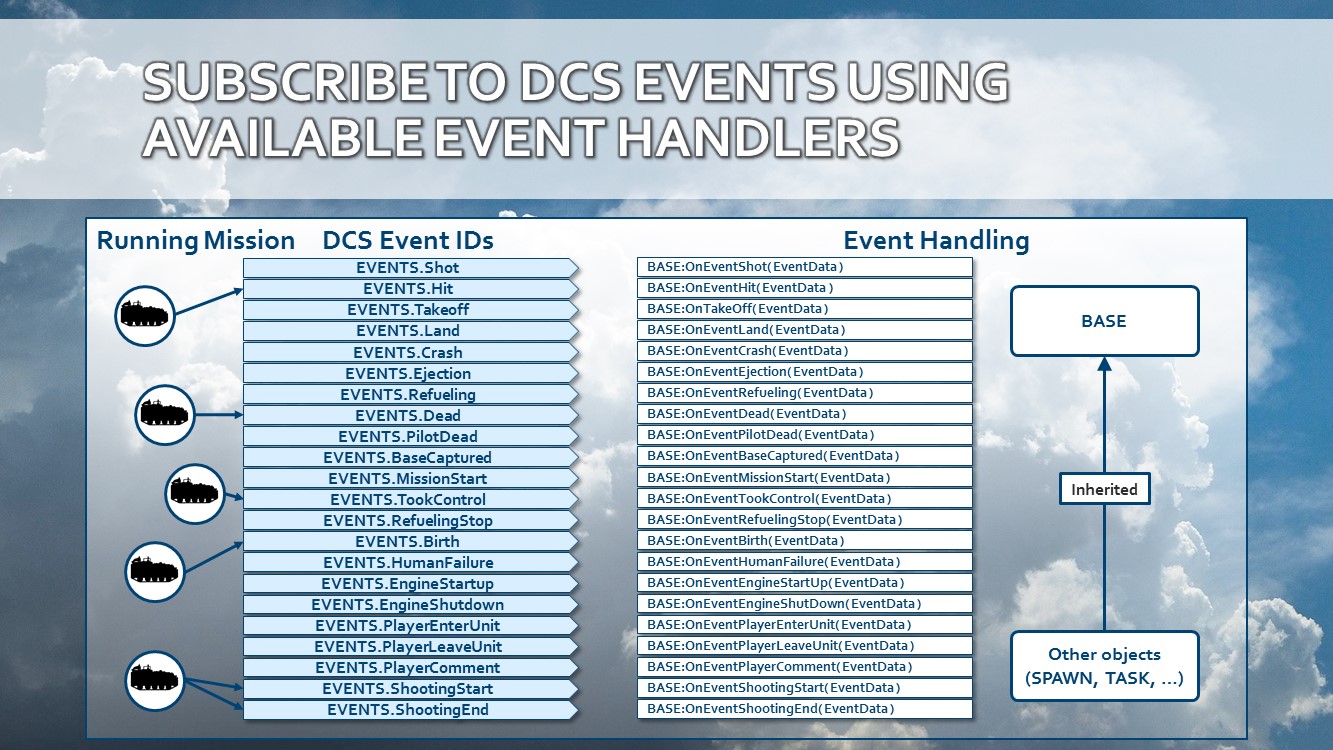
The following list outlines which EVENTS item in the structure corresponds to which Event Handling method. Always ensure that your event handling methods align with the events being subscribed to, or nothing will be executed.
2) EVENTS type
The EVENTS structure contains names for all the different DCS events that objects can subscribe to using the Base#BASE.HandleEvent() method.
3) EVENTDATA type
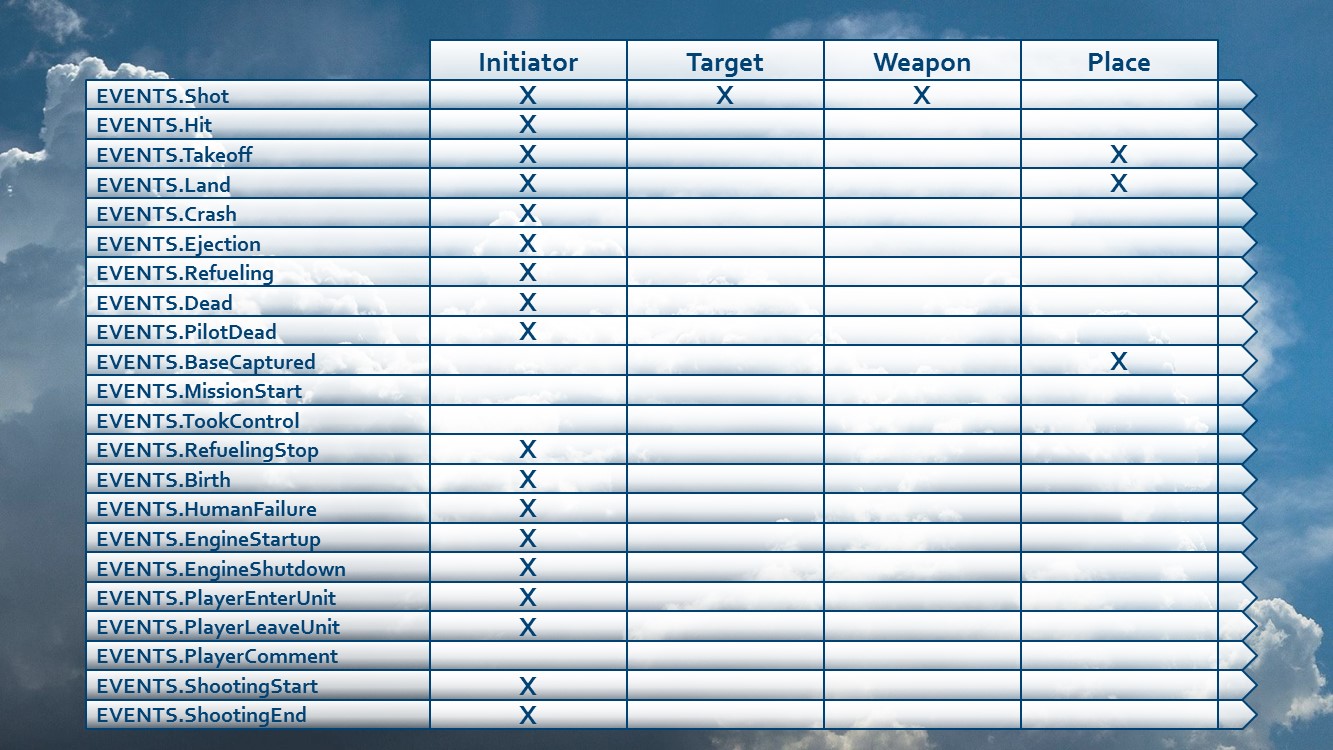
The EVENTDATA contains all the fields that are populated with event information before an Event Handler method is being called by the event dispatcher. The Event Handler received the EVENTDATA object as a parameter, and can be used to investigate further the different events. There are basically 4 main categories of information stored in the EVENTDATA structure:
- Initiator Unit data: Several fields documenting the initiator unit related to the event.
- Target Unit data: Several fields documenting the target unit related to the event.
- Weapon data: Certain events populate weapon information.
- Place data: Certain events populate place information.
Find below an overview which events populate which information categories:
API CHANGE HISTORY
The underlying change log documents the API changes. Please read this carefully. The following notation is used:
- Added parts are expressed in bold type face.
- Removed parts are expressed in italic type face.
YYYY-MM-DD: CLASS:NewFunction( Params ) replaces CLASS:OldFunction( Params ) YYYY-MM-DD: CLASS:NewFunction( Params ) added
Hereby the change log:
- 2016-02-07: Did a complete revision of the Event Handing API and underlying mechanisms.
AUTHORS and CONTRIBUTIONS
Contributions:
Authors:
- FlightControl: Design & Programming & documentation.
Global(s)
| EVENT | |
| EVENTHANDLER | |
| EVENTS |
Type EVENT
Type EVENT.Events
| EVENT.Events.IniUnit |
Type EVENTDATA
Type EVENTHANDLER
| EVENTHANDLER.ClassID | |
| EVENTHANDLER.ClassName | |
| EVENTHANDLER:New() |
The EVENTHANDLER constructor |
Type EVENTS
Global(s)
Type Event
Type EVENT
The EVENT structure
Field(s)
- #number EVENT.ClassID
- #string EVENT.ClassName
- EVENT:EventText(EventID)
-
Parameter
-
EventID:
-
- EVENT:Init(EventID, EventClass)
-
Initializes the Events structure for the event
Parameters
-
Dcs.DCSWorld#world.event EventID: -
Core.Base#BASE EventClass:
Return value
-
- EVENT:OnBirthForTemplate(EventGroup, EventFunction, EventClass, EventTemplate)
-
Create an OnBirth event handler for a group
Parameters
-
Wrapper.Group#GROUP EventGroup: -
#function EventFunction: The function to be called when the event occurs for the unit. -
EventClass: The self instance of the class for which the event is. -
EventTemplate:
Return value
-
- EVENT:OnCrashForTemplate(EventGroup, EventFunction, EventClass, EventTemplate)
-
Create an OnCrash event handler for a group
Parameters
-
Wrapper.Group#GROUP EventGroup: -
#function EventFunction: The function to be called when the event occurs for the unit. -
EventClass: The self instance of the class for which the event is. -
EventTemplate:
Return value
-
- EVENT:OnDeadForTemplate(EventGroup, EventFunction, EventClass, EventTemplate)
-
Create an OnDead event handler for a group
Parameters
-
Wrapper.Group#GROUP EventGroup: -
#function EventFunction: The function to be called when the event occurs for the unit. -
EventClass: The self instance of the class for which the event is. -
EventTemplate:
Return value
-
- EVENT:OnEngineShutDownForTemplate(EventTemplate, EventFunction, EventClass)
-
Create an OnDead event handler for a group
Parameters
-
#table EventTemplate: -
#function EventFunction: The function to be called when the event occurs for the unit. -
EventClass: The self instance of the class for which the event is.
Return value
-
- EVENT:OnEventForTemplate(EventTemplate, EventFunction, EventClass, OnEventFunction, EventID)
-
Create an OnDead event handler for a group
Parameters
-
#table EventTemplate: -
#function EventFunction: The function to be called when the event occurs for the unit. -
EventClass: The instance of the class for which the event is. -
#function OnEventFunction: -
EventID:
Return value
-
- EVENT:OnEventForUnit(EventDCSUnitName, EventFunction, EventClass, EventID)
-
Set a new listener for an SEVENTX event
Parameters
-
#string EventDCSUnitName: -
#function EventFunction: The function to be called when the event occurs for the unit. -
Core.Base#BASE EventClass: The self instance of the class for which the event is. -
EventID:
Return value
-
- EVENT:OnEventGeneric(EventFunction, EventClass, EventID)
-
Set a new listener for an SEVENTX event independent from a unit or a weapon.
Parameters
-
#function EventFunction: The function to be called when the event occurs for the unit. -
Core.Base#BASE EventClass: The self instance of the class for which the event is captured. When the event happens, the event process will be called in this class provided. -
EventID:
Return value
-
- EVENT:OnLandForTemplate(EventTemplate, EventFunction, EventClass)
-
Parameters
-
EventTemplate: -
EventFunction: -
EventClass:
-
- EVENT:OnTakeOffForTemplate(EventTemplate, EventFunction, EventClass)
-
Parameters
-
EventTemplate: -
EventFunction: -
EventClass:
-
- EVENT:Remove(EventClass, EventID)
-
Removes an Events entry
Parameters
-
Core.Base#BASE EventClass: The self instance of the class for which the event is. -
Dcs.DCSWorld#world.event EventID:
Return value
-
- EVENT:RemoveAll(EventObject)
-
Clears all event subscriptions for a Base#BASE derived object.
Parameter
-
Core.Base#BASE EventObject:
-
- EVENT:RemoveForUnit(EventClass, EventID, UnitName)
-
Removes an Events entry for a Unit
Parameters
-
Core.Base#BASE EventClass: The self instance of the class for which the event is. -
Dcs.DCSWorld#world.event EventID: -
UnitName:
Return value
-
- EVENT:onEvent(Event)
-
Parameter
-
#EVENTDATA Event:
-
Type EVENT.Events
The Events structure
Field(s)
- #number EVENT.Events.IniUnit
Type EVENTDATA
The Event structure
Field(s)
- #string EVENTDATA.IniUnitName
- #string EVENTDATA.TgtUnitName
Type EVENTHANDLER
The EVENTHANDLER structure
Field(s)
- #number EVENTHANDLER.ClassID
- #string EVENTHANDLER.ClassName
- EVENTHANDLER:New()
-
The EVENTHANDLER constructor
Return value
Type EVENTS
The different types of events supported by MOOSE.
Use this structure to subscribe to events using the Base#BASE.HandleEvent() method.